Oct 07, 2026

AI made it easy for anyone at Cabify to build a small tool or prototype, but sharing it safely was still hard. This is the story of cabify builders, a private publishing platform with almost nothing to run: why we built it, how it works and what our colleagues made with it.
At Cabify, a builder is anyone who solves business problems by creating software. Engineers always were. Over the last year, AI widened the circle to people who had never written code. Designers, operations colleagues, marketing and business teams describe what they want, iterate with an assistant, and end up with something that runs in a browser. One colleague turned a spreadsheet into a searchable register of eligible vehicles without writing the code themselves. None of it went through a ticket with engineering, and nearly all of it ended with the same artefact: a folder containing index.html.
Then they got stuck at the same point. A folder on a laptop cannot be shared, so screenshots went into chat, zip files were attached to messages, and things that should have been a link became a screen share. With nowhere to publish, work drifts to outside hosting, where nobody signs in, nothing is audited and nothing is removed when someone leaves. Nobody knows what company data is out there, and banning it only hides it better.
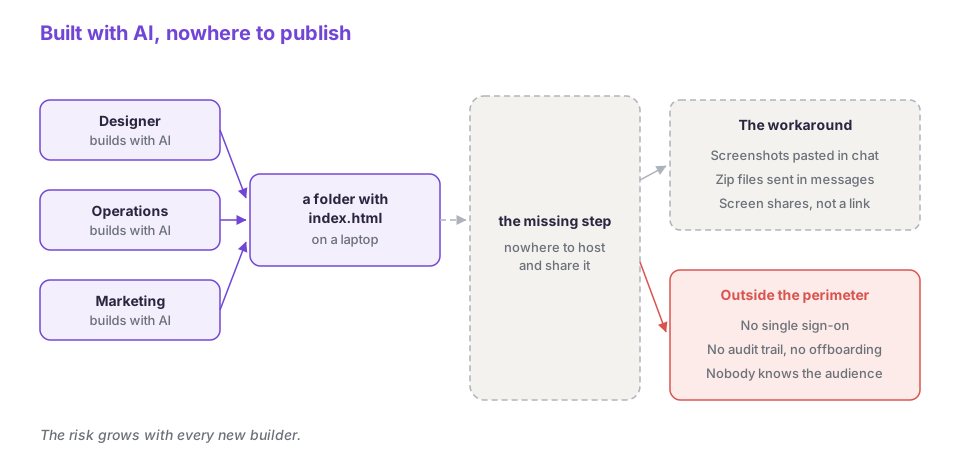 Everything up to the folder worked. The step after it was missing.
Cabify already had a publishing path for websites through code repositories. For Product, Marketing and anyone without a technical background, it was a wall of friction that kept them from experimenting at all.
AI solved “how do I build this” for people who never wrote software. It did nothing for “how do you see it”, and nothing for sharing the result securely and easily. The constraint on internal software moved from authorship to distribution, and most platform tooling, ours included, is optimised for authorship.
Three signals told us that a better repository workflow would not fix this. The work always looked the same: a static folder. The makers were mostly not engineers. And each thing needed a small audience: the most-viewed sites reach 20 to 100 people, and most reach far fewer. That is too small for a team, a repository and a service owner, and too useful to ignore.
So we left the first publishing path alone and built a second one. Cabify keeps a path for technical profiles, with more power: a repository, a merge request, a pipeline and a custom domain. On a product site owned by an engineering team, each of those steps is worth its cost. cabify builders is the second path, private by default and behind the same single sign-on (SSO).
Between the folder and the URL, the second path has no build step, no manifest, no review, no pipeline, no domain, no secrets and no cloud account. It keeps three things from the first path: SSO in front of every page, versioned storage underneath, and an audit trail of who published what.
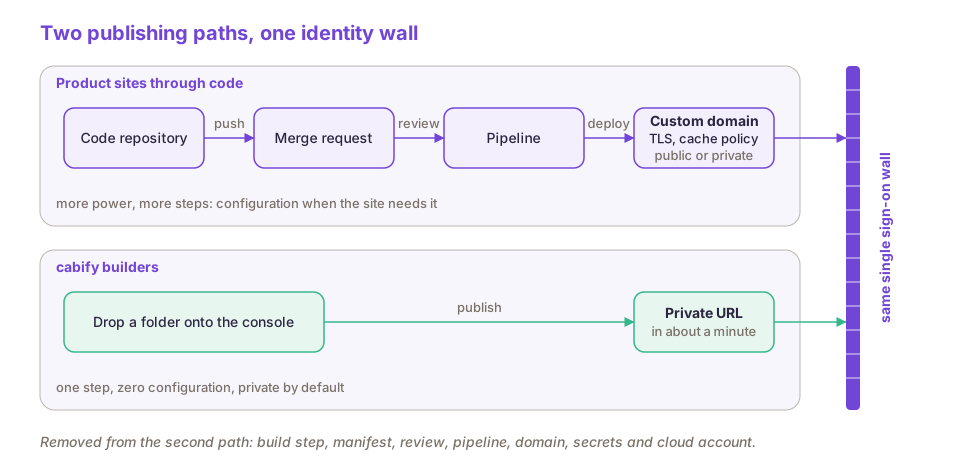 Two paths, one login. The repository path keeps its rigour; cabify builders keeps SSO and little else.
cabify builders is an internal publishing platform where any employee drags a folder onto a web page and gets a private URL behind SSO within a minute. Each site lives under the employee’s own path, /<your.name>/<site>/.
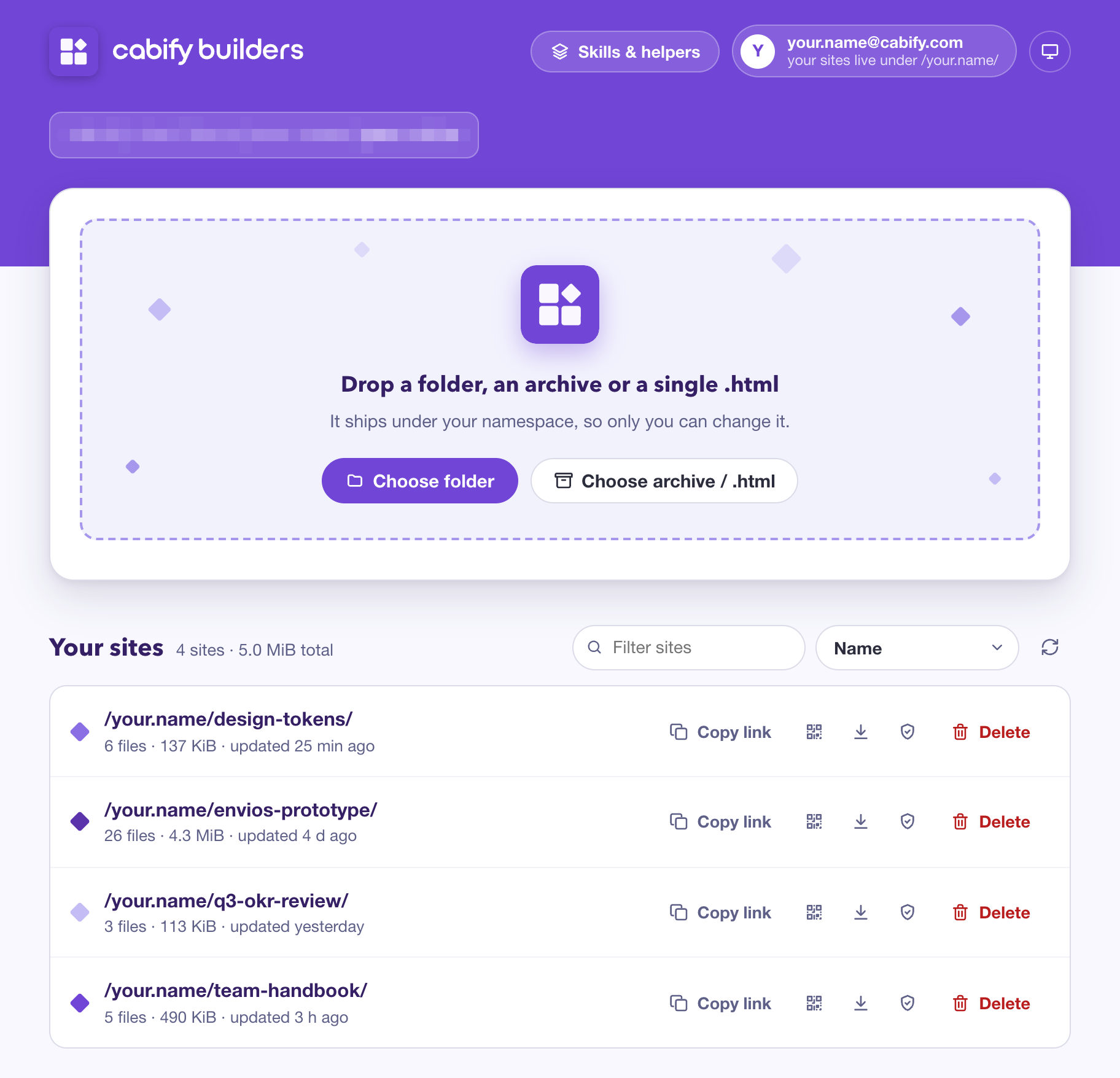 The whole publishing interface. Shown with a demo account and example sites.
Anyone can start publishing straight away, with no sign-up: the platform provisions a namespace from HR data for every active employee, often before they have heard of it. About 150 people have already published, and many more open the sites others share.
Everything is private by default and there is no public option. Anonymous visitors see a login redirect, and any employee can open any site unless its audience has been narrowed.
Mistakes are cheap. Every file version is kept for 90 days, and overwrite and delete are reversible by the user without involving us. Drafts need no machinery: publish to my-thing-draft and you have an authenticated preview.
There are four equivalent ways to publish: the web console, an AI agent skill, a shell script and the cloud storage CLI. The skill is one self-contained Markdown file that teaches an AI coding agent the whole workflow. All four publish with the employee’s own identity.
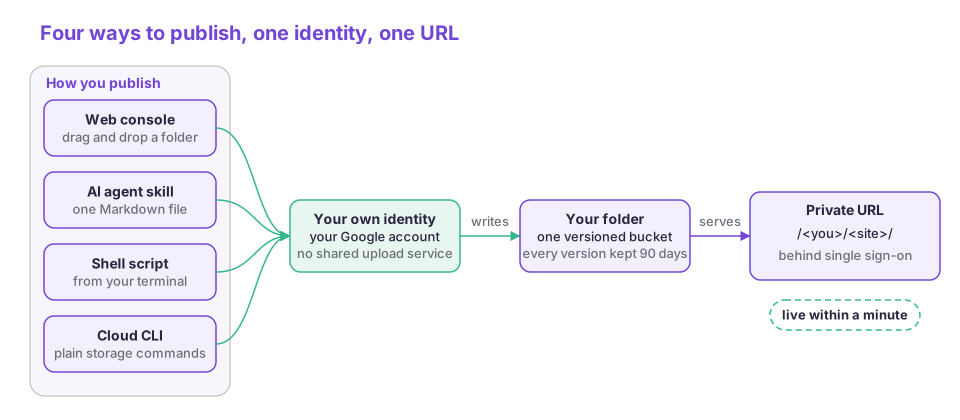 Four ways to publish, one identity, one URL. Pick the one that matches how you work; the result is the same.
The platform adds one small script to every HTML page it serves. That gives the platform a hook on every site without touching anyone’s files. Today it powers real-user metrics and a small “Published on cabify builders” badge that links back to the console, and it can carry a banner or a notice whenever the platform needs to speak to viewers.
The limits come from what the second path leaves out: no public sites, no custom domains, no server-side code, no per-site headers or cache tuning. Sites live under a path prefix, so root-absolute asset references 404. The console, the script and the skill lint for this and warn.
We followed Dan McKinley’s advice to choose boring technology. Every piece is an open-source project that runs at far larger scale elsewhere, doing the job it was built for. An NGINX ingress controller terminates the host. oauth2-proxy authenticates every request against Keycloak, our SSO provider. Behind it, a read-only nginx-s3-gateway serves files from one Google Cloud Storage bucket through its S3-compatible API. The bucket has versioning on and one folder per employee. There are no per-user proxies, clients or secrets, so nothing in the diagram below multiplies when the next hundred people join, and the bill grows with storage and traffic, not with headcount.
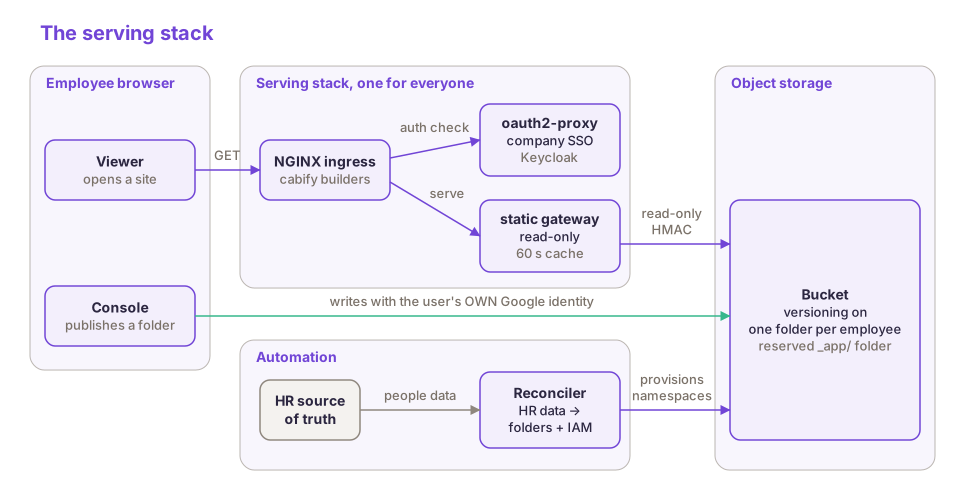 One proxy, one gateway, one bucket and one reconciler, for everyone.
Boring technology is half of the story. The other half is how we try to work: build reusable building blocks first, design them to fit together, and assemble the next thing from them. Cabify builders reuses the identity service the Security team runs for the whole company, which already exposed the roles we needed, the shared ingress fleet that already serves our other static sites, and the same GitOps pipeline as every other Kubernetes deployment. What we wrote ourselves is small: a console, a reconciler, a few scripts and some configuration. We stand on the shoulders of giants.
The part we would most recommend copying is how we split identity. SSO decides who you are and which pages you can see. It never writes anything. Publishing takes a different route: the browser uploads straight to object storage with the employee’s own Google account. There is no upload service in the middle, so there is no privileged account that could write into someone else’s folder. Each person can write to their own folder and nowhere else, and the storage audit log names whoever made each change.
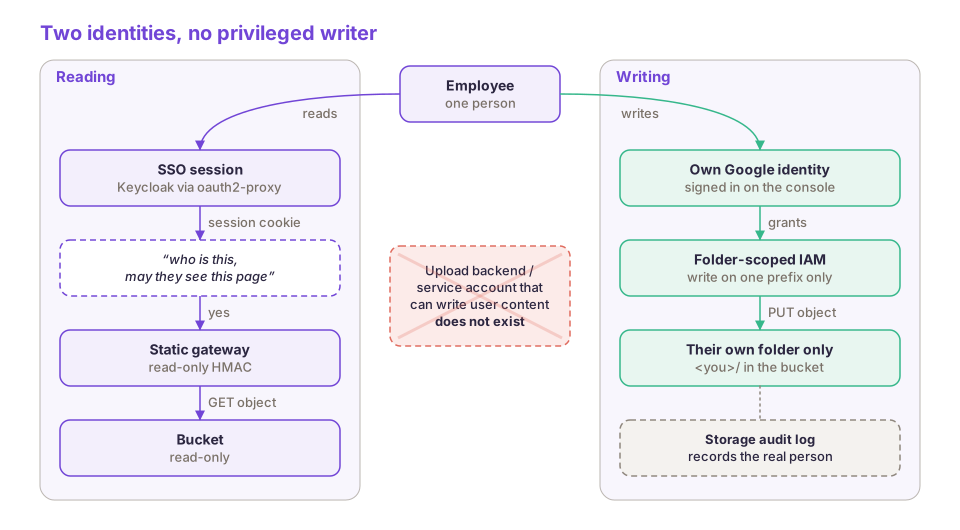 SSO only reads. Each person writes to their own folder with their own account.
By default every employee can open a site, and people outside the company who hold a company account can be added after review. Some sites need a narrower audience, such as a leadership dashboard or one department’s tool. Narrowing takes two reviewed merge requests and no new infrastructure: a role and access rule in the identity source of truth, and an Ingress manifest that records owner, audience and reason. Access policy at Cabify gets human review, and a console that wrote policy directly would bypass it.
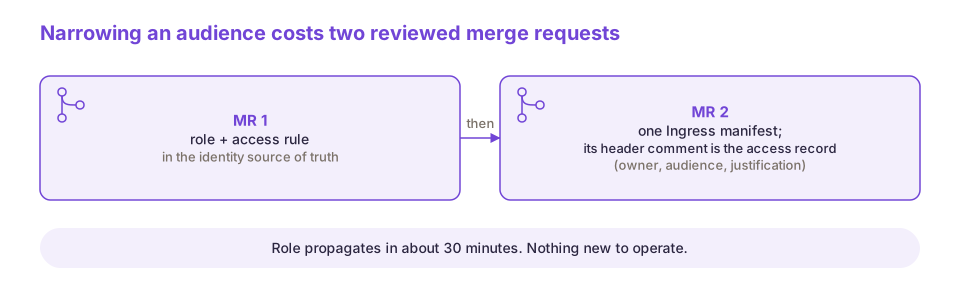 Two reviewed changes and no new infrastructure: the role and the Ingress manifest are the whole access record.
When someone joins Cabify, they show up in the HR data, and a job that runs every day, the reconciler, creates their folder and lets their Google account write to it. Nobody has to ask for anything. When someone leaves, the next run takes that write access away, and they stop seeing sites once their SSO account is deactivated. Their content is not deleted at this point, but it will expire automatically after 90 days. Each run also puts back any permission that was changed by hand. Sometimes a new joiner’s Google account is created after their HR record. We call these people ghosts: they get their folder straight away and write access once the account exists.
The reconciler has a safety threshold. It aborts if more than 5% of folders would lose their owner, or if more than 5% of people have no Google account. A broken HR feed cannot mass-revoke.
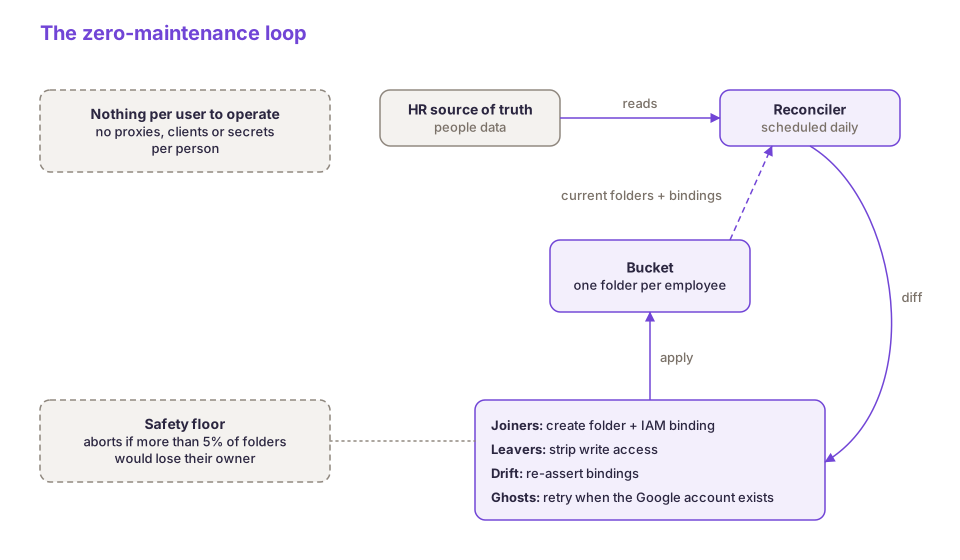 The reconciler is the only thing that touches per-user state, and it refuses to act on a broken feed.
The console itself is platform content: a static app in a reserved folder of the same bucket, served by the same proxy and gateway, so deploying it is a copy. The whole stack is declared in Git and reconciled automatically, like the rest of our Kubernetes deployments. The operational surface is two proxy replicas, two gateway replicas, one scheduled job and one bucket.
Two Grafana dashboards watch the platform. The first shows platform health: golden signals for the shared stack, from proxy and ingress metrics, service-mesh metrics for the gateway, and logs. When someone reports being denied on a site, it tells us within seconds whether that is one person or everyone. The second shows adoption: page views, distinct viewers and engagement time. We measured the usage numbers of each site with Grafana Faro, which runs inside the injected script, plus the console’s own events. Faro also backs our web performance work, and its events land in the same Grafana Alloy stack as our mobile observability.
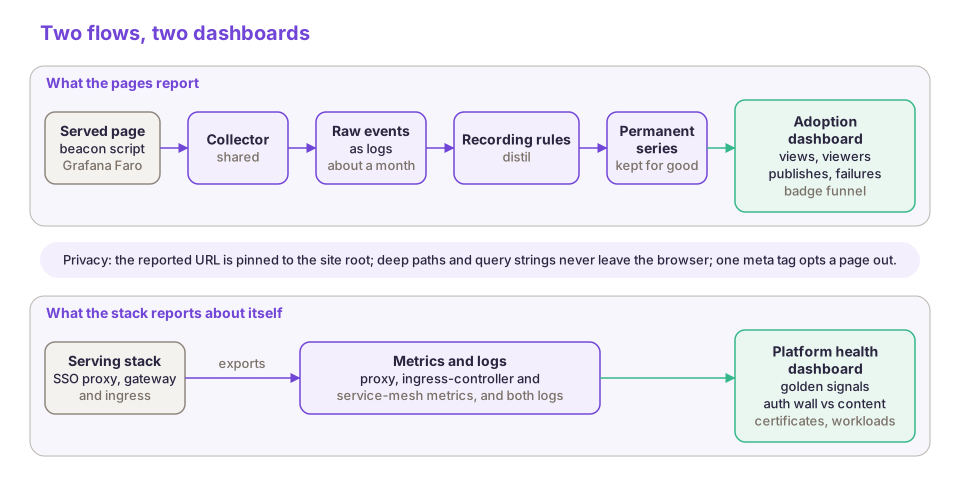 Two flows, two dashboards: what the pages report, and what the stack reports about itself.
A new group of people, most of them outside engineering, now ship small working tools and prototypes to their colleagues as links rather than screenshots. The numbers come from the adoption dashboard and are rounded.
| cabify builders in numbers | |
|---|---|
| People who published (each counted once) | about 150 |
| Sites viewed | about 600 |
| People who viewed a site (each counted once) | about 560 |
| Site views | about 10,000 |
What people built surprised us. There are prototypes, but the most-viewed sites are operational tools nobody asked engineering for, such as a business transformation knowledge hub accessed by close to 100 people, city operations cockpits, or the spreadsheet-based register of eligible vehicles from the opening. For every person who published a site, nearly 4 colleagues accessed it. Once the beta testers’ first burst had settled, weekly successful publishes more than quadrupled in five weeks, to nearly 300 a week.
The Design team, whose critique culture and move to image AI we have written about before, built the clearest example on their own. A Figma plugin they wrote exports a design, an MCP server (Model Context Protocol, the standard way agents connect to tools) connects Figma to their AI coding agent, and cabify builders publishes the result. Going from Figma to a clickable prototype now takes hours instead of weeks, and by their own count they published around 20 prototypes in six weeks.
Adoption spread through the product itself. Every page carries a small “Published on cabify builders” badge, and that alone brought more than 80 colleagues to the console with no campaign. More than 30 people downloaded the publishing skill or script in a month. One of them, with no technical background, had a shareable link within minutes.
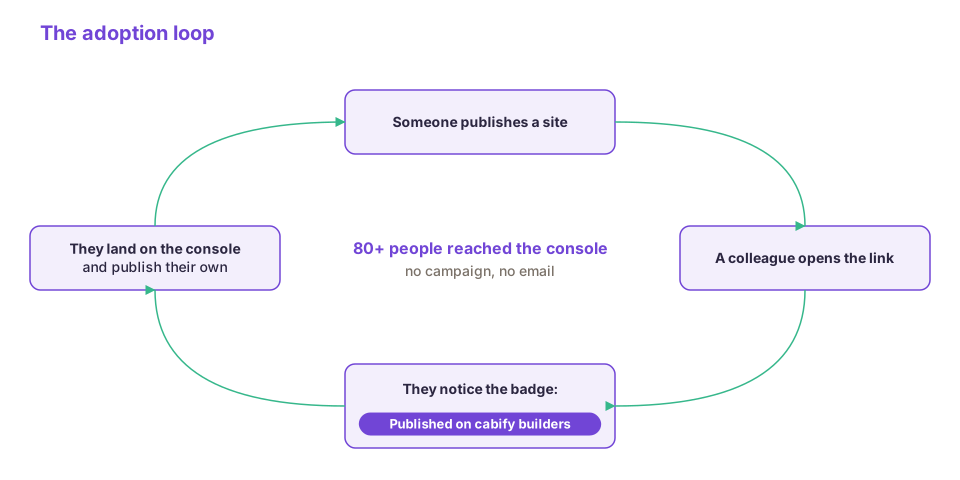 The front door is inside every page the platform serves.
Privacy turned out to matter as much as convenience. SSO started as a security requirement, but it is also why people publish half-finished work: the audience is bounded to colleagues. The fear that stops early sharing is rarely “my hosting might go down”. It is “what if the wrong person sees this”.
About 1 in 6 publish attempts have failed, and two failure classes account for almost all of them. Of the failures, roughly 60% were partial uploads of very large folders in a browser tab. Roughly 40% came from one unticked checkbox on Google’s consent screen, which shows storage access as a granular permission the user can skip. Every publish afterwards fails with an error that explains nothing. In the most recent month the checkbox overtook partial uploads. We warn in the console and in the docs, and it is still with us.
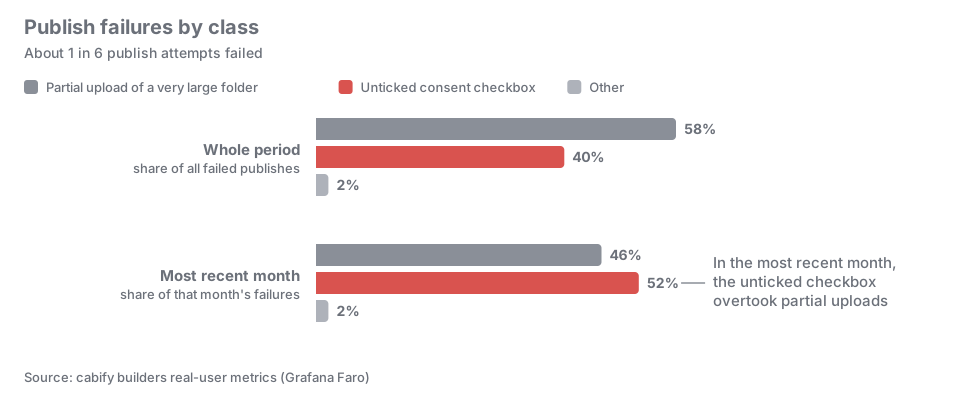 Most failures are a browser tab giving up or a checkbox nobody ticked.
A static site is a front end without a back end, and people now want pages that read and act on company data. Mythril is Cabify’s API gateway for the builders ecosystem. Sites on cabify builders can already call it with the visitor’s own short-lived token, sent as a Bearer token, and never with the owner’s identity. The page asks the SSO proxy for that token on each request and passes it to the gateway, which decides what the visitor may call. How the gateway works deserves a post of its own, so keep an eye on our tech blog!
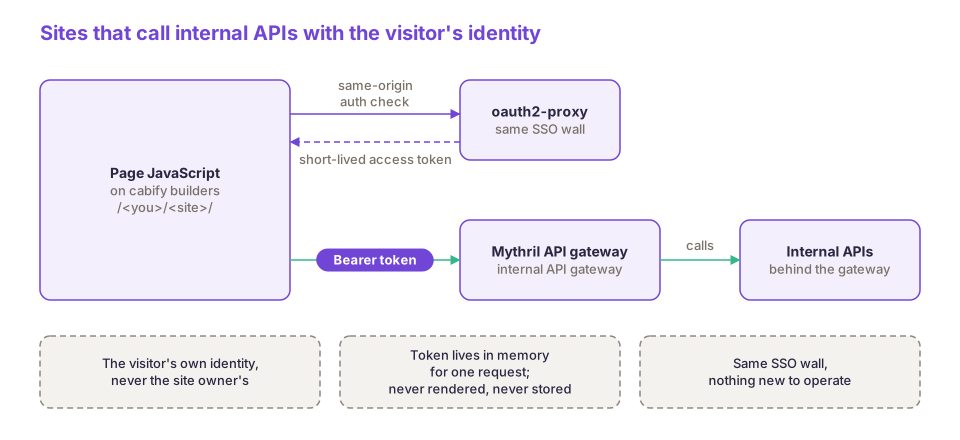 The visitor’s own token, fetched per request, never written into the page.
This tooling exists because of people across the company. The platform team designed and built it. The Design team tested it in beta and turned it into a workflow of their own. The Security team built the identity service that made SSO and per-site roles something the platform could consume rather than build. Everyone who published a site and told a colleague did the rest.

Senior Infrastructure Engineer