

Design
One catalog, all resources: How we built Cabify's Design Assets Catalog
Nov 19, 2026

One of the visual elements that most sets the Cabify brand apart today is our collection of illustrations. On the Design team, we’re fortunate to work closely with Miguel Camacho, who expands the collection every week to address new use cases, campaigns, or needs.
Most of this weekly maintenance work falls to the Core Design team, which, along with Miguel, has also recently completed a major visual redesign project: you’ve probably already noticed the new, much more dynamic and less geometric illustration style used, for example, in our cars and campaigns.
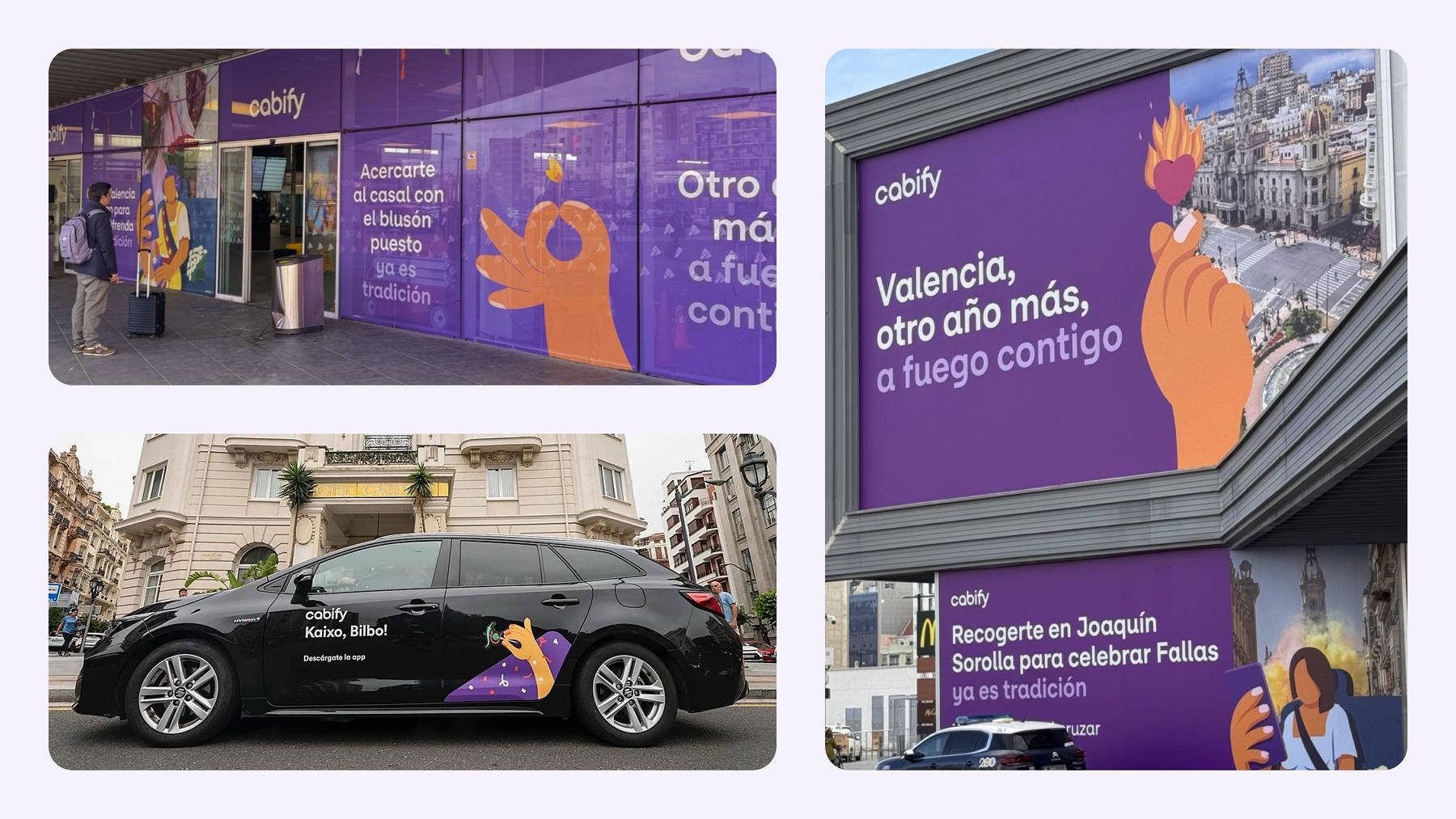
If we add our own icon set, the new Cabify Ciudad typefaces, and logo variations to this entire revamped and expanding gallery, the total number of resources to manage rises to more than 2,600.
So, how do you get all of this across to the teams working both inside and outside Cabify? If you don’t have a strong distribution process, much of the work done by Core Design may go unnoticed and lead to misalignment in how the brand image is communicated.
Until now, solutions varied depending on the team: Figma libraries, a bucket managed by the technology team, or a Google Drive folder shared with the rest of the company. Responsibility for each of these sources was unclear, and maintenance tasks were mostly manual and depended on individual memory or habits.
This diversity of sources meant that teams were unaware of new additions and didn’t know how many visual resources they actually had at their disposal. Digital products continued to use outdated illustrations, and colleagues in Marketing and at external agencies were left to search blindly through folders, hoping to find something that would work for their project.
Building the solution
With the launch of the new Product Design System team and the arrival of new Artificial Intelligence tools, we decided it was time to start organizing all the System’s resources into a GitLab repository that would serve as the single, up-to-date source of truth—and for which the team that created them would be responsible. This would free developers and other team members from maintenance tasks.
These company assets were not to be tied to any third-party software, development language, or platform, and anyone could easily access them, ready to use without any friction.
The hosting
The first step was to determine where we could host these files. The Infrastructure team suggested creating a new Google Cloud Storage bucket as a solution. From there, we could connect it to our new repository, manage file uploads, and obtain the public URLs for those files.
The connection to Figma
With our destination clear, we now had to build the bridge connecting it to the source: Figma’s libraries, which store all the design assets. In our case, these were four libraries built at different times by different people—and different criteria. Over-editing these libraries to force unification could break the instances already in use across thousands of screens in the product, not to mention requiring an investment of time we simply didn’t have. So, to avoid this, we created a script capable of adapting to the characteristics of each library, page, and asset. We developed rules for metadata extraction, filename generation, and image format export.
We then set up a pipeline in GitLab CI that would run automatically every time one of these libraries was published, comparing the most recent date for each Figma component ID.
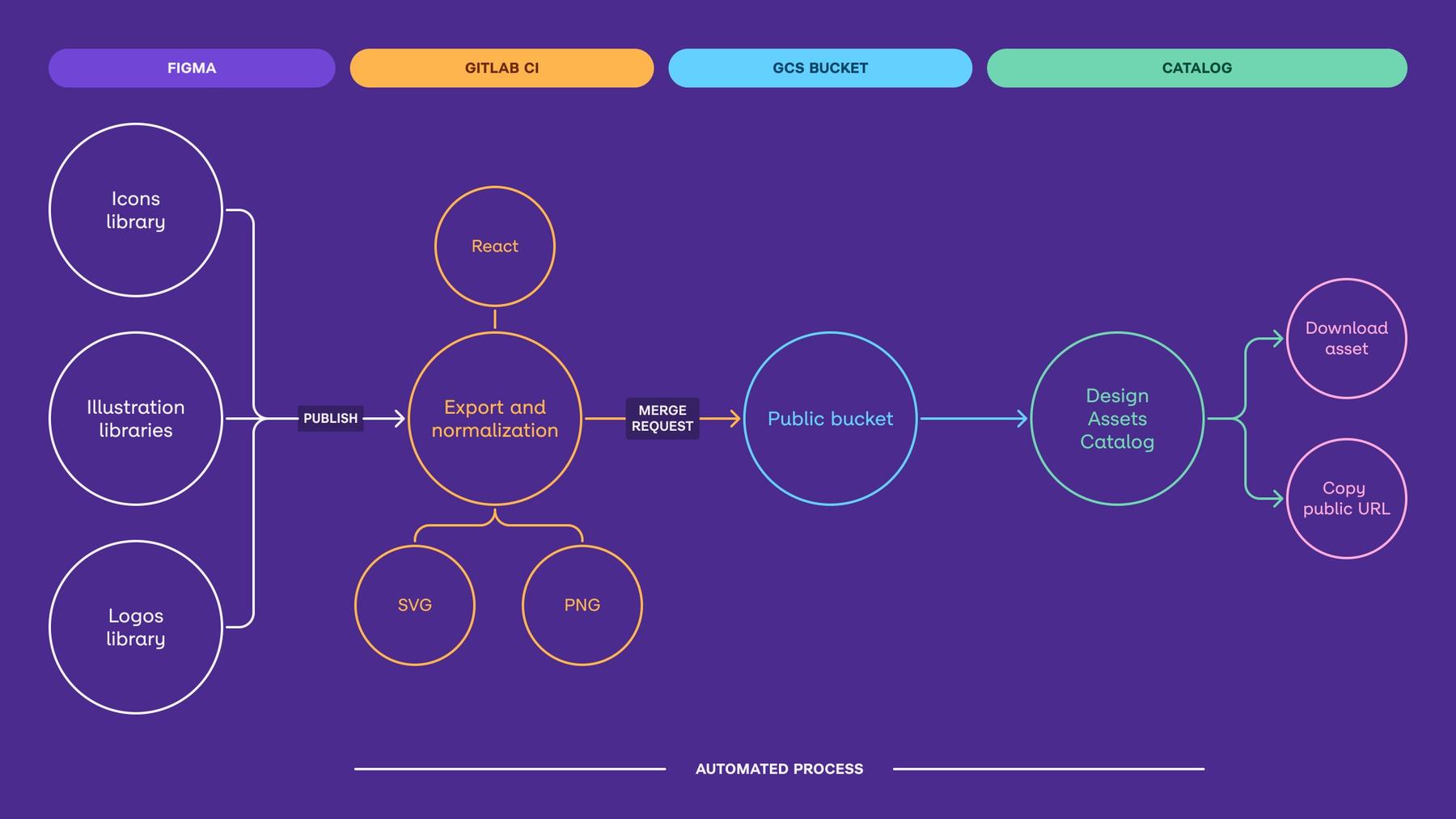
With this, we were able to connect the three key components: Bucket, GitLab, and Figma. But there was still one other key question: How do users interact with it?
The Design Assets Catalog
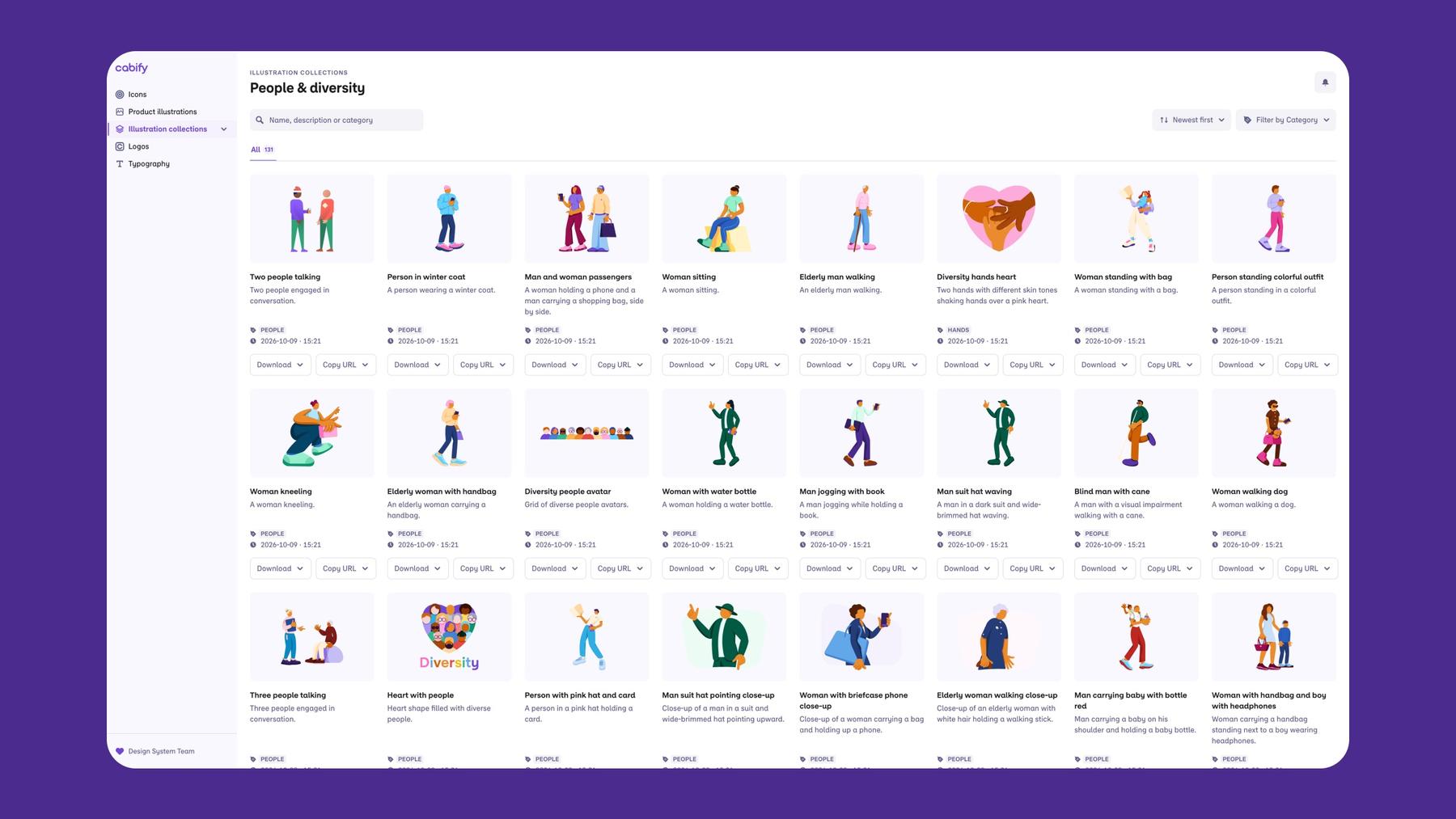
We needed a simple system to visually display all our assets—a searchable catalog that would allow us to categorize each type of item. But above all, we wanted it to help users find exactly what they were looking for.
So we took inspiration from something the frontend team had already built in React Storybook: a page that displayed each illustration and icon in a grid, along with its name and corresponding link.
To accommodate the wide variety of people and uses of the catalog, we’ve added some extra features. Many users don’t know exactly which illustrations are available, so they search by concept: if someone searches for “driver,” they want to see all the illustrations featuring a driver so they can choose the one that best fits their needs. Or they may simply want to see all the illustrations that share a common category, such as “Cabify Club.”
So, taking the opportunity presented by the visual redesign and agent automations, we renamed all the illustrations in the system to correct those that had become outdated. We added literal descriptions to each one, fixing duplicated elements, and reorganizing them. We also came up with our own tagging system using Figma frames. All of this generated new metadata that now allows users to search by name or description, filter by category, or even sort by date.
In addition, to meet the needs of developers and marketing teams alike, two buttons allow you to copy the asset’s public URL to embed it on websites or in apps, or even download it in different formats and resolutions.
And finally, to improve the visibility of new additions to the catalog, we’ve added a notifications panel that informs users of new items during each session. This allows users to access them with a single click, eliminating the need for intermediate navigation and search steps.
Conclusions
Through this project, we’ve learned to consolidate all product asset management and distribution into a single, up-to-date source of truth. We’ve automated processes that were previously done manually and created a workflow that allows us to scale in the future. But above all, we’ve created a self-service system that saves us all time when resolving requests.
New Artificial Intelligence tools have allowed us designers to explore new ways of organizing our resources and creating automations that would otherwise have taken months of work and involved numerous dependencies. They enable us to expand our scope without taking away space from developers, and even save them from maintenance tasks, time, and responsibilities outside their area of expertise. It’s one of the advantages that today’s technology offers without compromising the creativity of what we do.
Kudos to everyone involved in every step of the project, but especially to Alex Simancas and Amanda Pitillas for all their work maintaining, renaming, and reorganizing the Figma libraries.

Javier Gil
Senior Product Designer
Bringing our culture to life through stories—discover it in our blog.
Design
One catalog, all resources: How we built Cabify's Design Assets Catalog
Nov 19, 2026

Engineering
Scaling Chatbot Intelligence: Our Path to Multi-Agent AI
Oct 21, 2026

Product
From fragmented workflows to a Connected experience
Oct 14, 2026

Engineering
After the Prompt: How Anyone at Cabify Became a Builder
Oct 07, 2026

Engineering
Stacking
Sep 30, 2026

Engineering
Python Concurrency: Serving ML Without Dying in the Process
Sep 23, 2026

Design
Scaling inclusive design: accessibility as a base
Aug 14, 2026

Culture
The CREP Experience: Building at scale as a fresh graduate
May 28, 2026

