Dec 10, 2025

Picture this: Over 1,000 containerized microservices running in production, deployed by 20+ engineering teams, processing hundreds of thousands of rides daily across multiple countries. Each container image potentially carries security vulnerabilities that could compromise our systems, our data, and most importantly, our customers’ trust. This isn’t just a hypothetical scenario—this was Cabify’s reality before we built our container image certification system.
The security nightmare of unknown vulnerabilities accumulating as technical debt is a challenge every engineering organization faces. But what if we told you that today, Cabify runs zero unknown critical vulnerabilities in production? This is the story of how we built a security chokepoint that transformed our security posture from reactive patching to proactive prevention.
Clarification: We’re not talking about zero-day vulnerabilities as those are unknowable by definition. We mean publicly disclosed CVEs that could exist in our systems but remain unidentified. Our system ensures all known critical vulnerabilities are detected and addressed.
At Cabify, we pride ourselves on engineering excellence and nimble innovation. Our teams deploy hundreds of times per day, using different technology stacks: from Go to Elixir. Cabify has a culture of strong ownership, where each team owns their deployment pipeline, choosing their base images, dependencies, and deployment patterns. This autonomy drives innovation but creates a security challenge: how do you ensure consistent security standards without becoming a bottleneck?
Before implementing our certification system, we faced several critical issues:
The traditional approach of periodic security audits and manual reviews simply couldn’t scale with our deployment speed. We needed an automated, transparent, and enforceable security system that wouldn’t slow down our developers.
Insight: Security shouldn’t be a gate that blocks progress but a foundation that enables confident, rapid deployment.
Before diving into our solution, we need to address the elephant in the room: Why build a custom tool when existing solutions exist?
The container security market offers numerous scanning solutions, from cloud native services to open source tools. However, we faced a unique set of requirements that existing solutions couldn’t address holistically:
| Requirement | Why it mattered | Existing solutions gap |
|---|---|---|
| Cryptographic proof of scanning | We needed evidence that images were scanned, not just policy compliance | Most tools focus on detection, not attestation |
| Multi-architecture support | Our workloads run on AMD64 & ARM64 nodes for cost optimization | Limited native support for multi-architecture manifest |
| Zero-config team integration | 20+ teams with different tech stacks needed seamless onboarding | Solutions require complex per-team configuration |
| GitOps-compatible enforcement | Policies must be reviewable and controlled | Cloud services often lack declarative policy management |
| Break-glass capabilities | Critical incidents require secure override mechanisms | Most tools offer all-or-nothing enforcement |
| Performance at scale | 1,000+ daily image certifications with <5min pipeline duration | Enterprise solutions often sacrifice speed for features |
| Cost-effectiveness | Budget-conscious approach maximizing ROI on security | Enterprise licensing models often don’t align with our operational scale and build speed |
We evaluated several market-leading solutions before making our build decision
Palo Alto - Prisma Cloud, while offering multi-cloud security capabilities, presented challenges in our context: the licensing model didn’t align with our operational scale, complex policy configuration requiring per-team setup, and limited GitOps integration for declarative policy management. Most critically, it focused on detection and remediation rather than providing cryptographic attestation that images were scanned and without unknown critical vulnerabilities.
Aqua Security offered strong vulnerability management but required extensive configuration across our 20+ teams and lacked the almost zero-config integration we needed. The platform’s emphasis on lifecycle scanning came with performance overhead that would have impacted our speed requirements.
This analysis drove us to the conclusion that the only way to satisfy all these requirements was to build our own homemade solution. We did not build it because we love reinventing wheels, but because no existing wheel fit our specific wagon.
Our in-house solution is approximately 12x more cost-effective than enterprise alternatives when considering both operational and licensing costs, making it an economically sound decision alongside the technical benefits.
Engineering insight: Sometimes the right solution isn’t a single tool but an orchestration of proven components addressing your specific context.
Our solution implements defense in depth through three complementary layers, each designed to catch vulnerabilities at different stages of the deployment lifecycle:
Each stage has its own specialized logic and enforcement mechanisms, but together they form a security chokepoint that ensures no vulnerable image can slip through to production undetected.
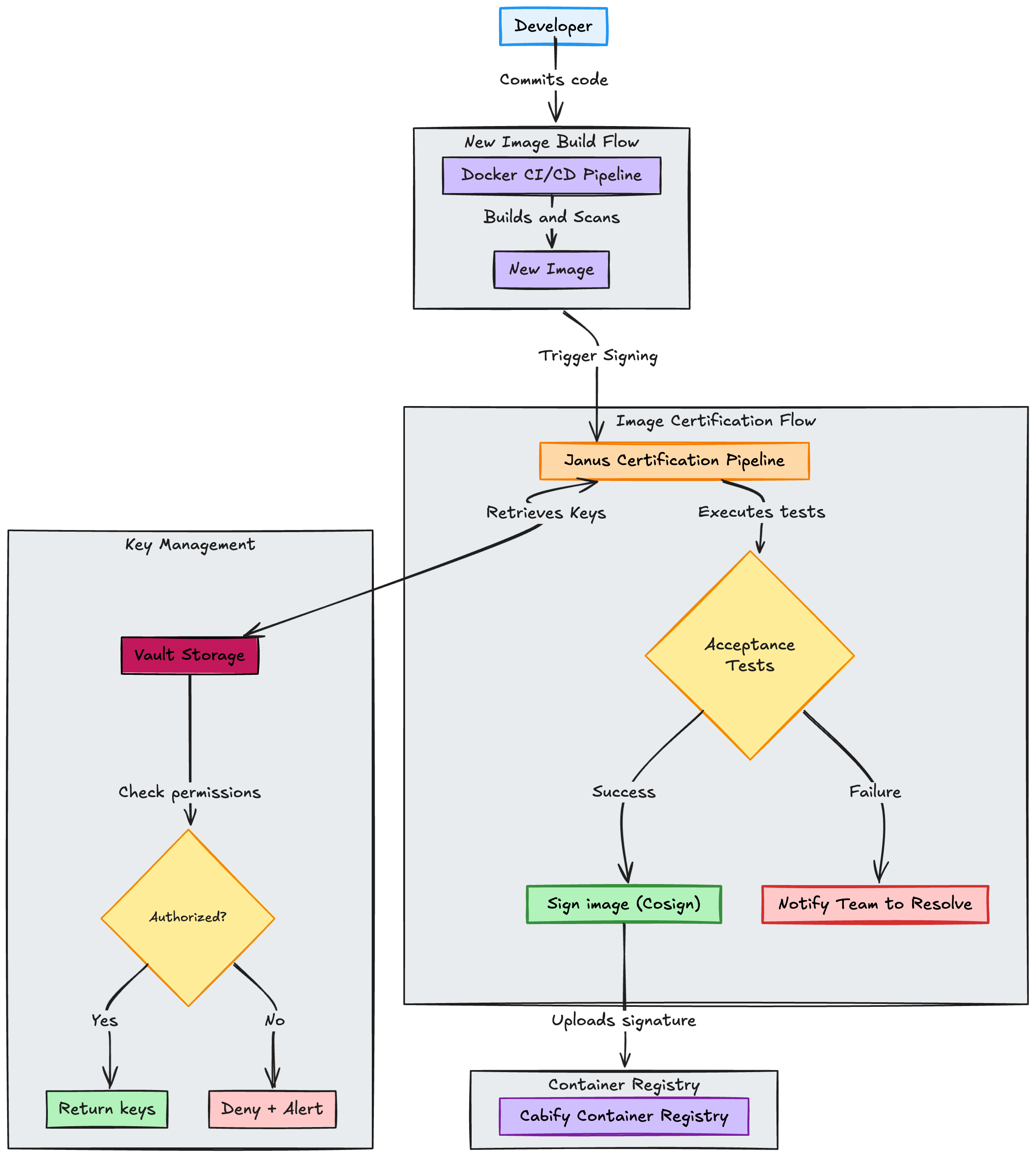
Janus, our container image certification pipeline, acts as the first line of defense. Like the Roman god of doorways, it ensures that only compliant images receive our cryptographic seal of approval. Janus stands vigil at the boundary between “works on my machine” and “safe for production”.
The certification process includes:
Key design decision: This certification is entirely controlled by the Infrastructure team, developers cannot bypass it.
Easy to use: We have encapsulated the security scanning logic in a function that can be used by any team, improving their experience and reducing the time to adopt the new security model.
The second layer prevents unsigned or unverified images from entering our Kubernetes clusters.
At Cabify, we maintain a dedicated repository containing all Kubernetes manifest definitions for our services. These manifests are automatically deployed to our clusters using ArgoCD, which continuously syncs the desired state from our Git repository to the actual cluster state.
The complete flow shows multiple validation points:
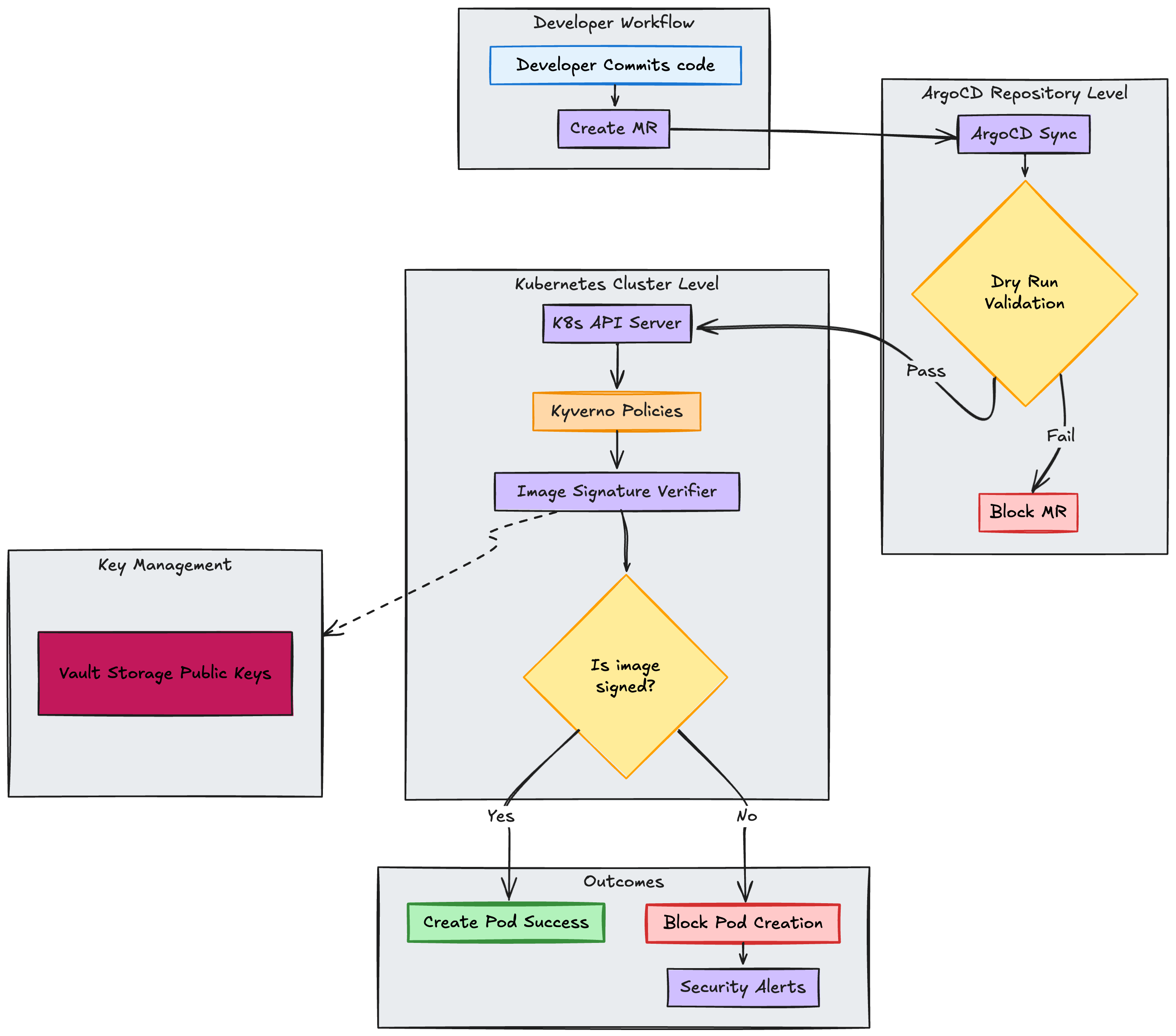
We needed a way to enforce our security policies at scale in our Kubernetes clusters. The idea was to trigger a webhook when a new image is deployed and check if it is signed and compliant with our security policies. We ended up choosing Kyverno for this purpose after evaluating multiple options.
Kyverno at Cabify: This is not our only use case of Kyverno. It is our tool for kubernetes cluster compliance enforcing security and reliability standards at scale. Keep an eye on our blog for an upcoming post about Kyverno that will give you a full picture of this tool and its capabilities!
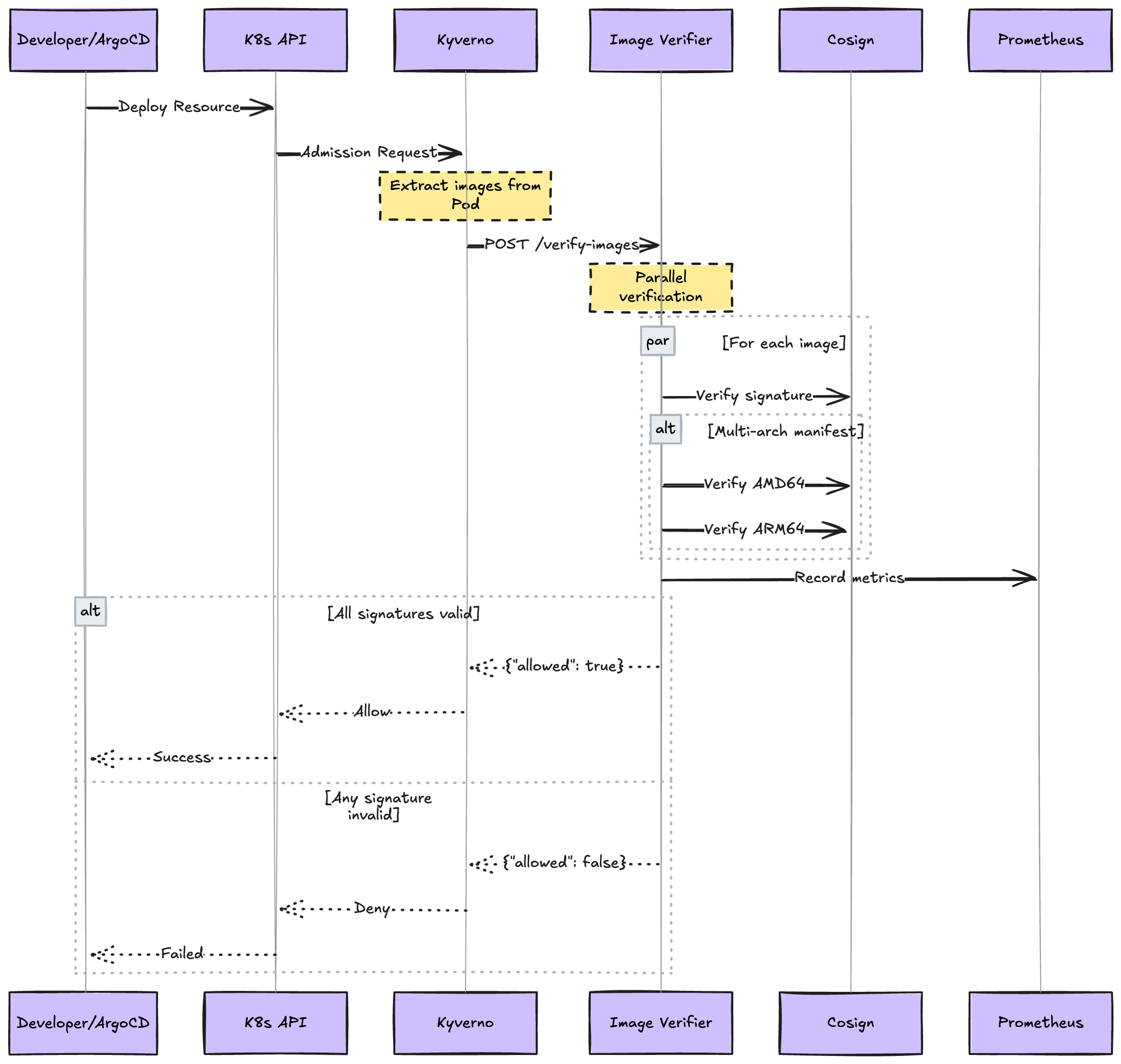
We built a custom verification service to handle the complexity of multi-architecture images and provide the performance we needed at scale.
Our image signature verifier has the following features:
The architecture of the image signature verifier is the following:
Our X days signature retention period serves as an automatic enforcement mechanism. When a signature expires:
Y days ensures pods eventually restart.This creates a natural cadence for security updates without manual intervention.

The third layer provides continuous security monitoring of running workloads. This continuous monitoring system provides:
A more detailed view of the layer 3 is the following:

Critical design: Multiple safety nets ensure vulnerabilities cannot persist indefinitely
When a new critical vulnerability is discovered in a previously signed image, our response system provides multiple safety nets:
Immediate response (0-6 hours):
Periodic rebuild safety net (varies by team):
Signature expiration enforcement (X days maximum):
X days.Y days node recycling, ensures maximum exposure of X + Y days.This approach balances security enforcement with service availability, avoiding immediate downtime while ensuring vulnerabilities cannot persist indefinitely.

We have a dashboard that provides visibility through real-time tracking of blocked deployments with owner attribution, vulnerability distribution analysis by severity and age, team-by-team security scorecards with MTTR tracking, multi-architecture adoption rates, and trend analysis to identify recurring issues and performance metrics across different architectures.


Sometimes vulnerabilities can’t be fixed immediately due to upstream dependencies, false positives, or business constraints. When this happens, teams can request temporary exceptions through our centralized system.
The process is straightforward: teams specify which CVE they need to exempt, provide a clear business justification, and set an expiration date. All exceptions are managed through infrastructure-as-code principles, ensuring complete transparency and accountability.
The main benefits of this approach are:
We know that an absolute and not flexible security enforcement could potentially block critical fixes during incidents. For this reason, we have implemented an emergency override system that provides a secure escape hatch as a break-glass procedure: By setting an environment variable, the image will be signed with the emergency flag even if the CVE is not excepted in the CVE SSOT.
Audit trail: The emergency override is tracked through Prometheus metrics. Every override triggers a post-incident review to understand why it was needed and how to prevent future occurrences.
After this long text, let’s give your scrolling finger a break and let the numbers speak for themselves:
| Metric | Before | After | Improvement |
|---|---|---|---|
| Unknown Critical CVEs in Production | 150+ | 0 | 100% reduction |
| Mean Time to Remediation (Critical) | Unknown (Weeks/Months) | 7 days | Measurable & Reduced |
| Teams Onboarded | No aligned security policies | 20+ | 100% |
| Daily Images Certified | 0 | 600+ | 100% |
| Policy Violations Blocked | 0 | 100+ | 100% |
Building a security chokepoint that achieves zero unknown critical vulnerabilities in production isn’t just about technology, it’s about creating a security culture where protection and productivity coexist. Our container image certification system proves that with the right architecture, tooling, and approach, you can achieve enterprise-grade security without sacrificing developer speed.
The key insight? Security shouldn’t be a gate that blocks progress but a foundation that enables confident, rapid deployment. By making security automated, transparent, and integrated into the development workflow, we’ve transformed it from a burden into a competitive advantage.
This achievement wouldn’t have been possible without the dedication of our cross-functional teams:

Software Engineer

Senior Software Engineer